A small medical practice does not need the most complicated billing platform on the market. It needs software that can move a claim from the patient encounter to the payer, return payment information, surface denials and show what is still sitting in accounts receivable without forcing a small staff to work across five disconnected systems.
That is the real test of medical billing software for small practices. The best fit is usually the system that matches the practice’s claim volume, specialty, staffing model and existing EHR. A solo physician may need a simple billing first platform. A growing group may need a connected EHR, practice management and billing stack. A small billing company may care more about multi-client workflows, clearinghouse connectivity and automation.
This guide explains what medical billing software is, how medical billing software works, which features matter, what it costs and how to choose a platform that will still fit after the practice grows.
Software automates transactions, but it does not work your denials, chase unpaid claims or fix coding errors for you. That is where iSolve RCM comes in. iSolve RCM is a U.S. medical billing company serving 45+ specialties, and its certified billers and coders work inside your billing software and EHR to handle medical coding, claim submission, denial management, A/R follow-up and provider credentialing. Throughout this guide, we point out the steps where software ends and an experienced billing team makes the difference.
What Is Medical Billing Software?
Medical billing software is a system that converts patient, coding and charge information into billable claims, submits or routes those claims to payers and tracks the financial activity that follows. Depending on the product, it may also handle eligibility verification, claim scrubbing, electronic remittance advice, payment posting, patient balances, denial worklists and A/R reporting.
For a physician office, medical billing software is only one part of the broader revenue cycle management process. The software can automate transactions and organize work, but staff still need to resolve coding questions, payer edits, authorizations, underpayments and denials when the system cannot make the decision on its own.
What Is Cloud-Based Medical Billing Software?
Cloud-based medical billing software is hosted by the vendor and accessed through the internet rather than installed and maintained on a local office server. For a small practice, that usually means less local IT maintenance, easier remote access and automatic vendor updates. It also means the practice must evaluate the vendor’s uptime, backups, access controls, security practices and data export process before signing a contract.
Cloud access does not remove HIPAA responsibilities. The HIPAA Security Rule requires appropriate administrative, physical and technical safeguards for electronic protected health information. A vendor can provide a compliant platform and business associate agreement where required, but the practice still has to control users, devices, permissions and day-to-day handling of ePHI.
How Does Medical Billing Software Work?
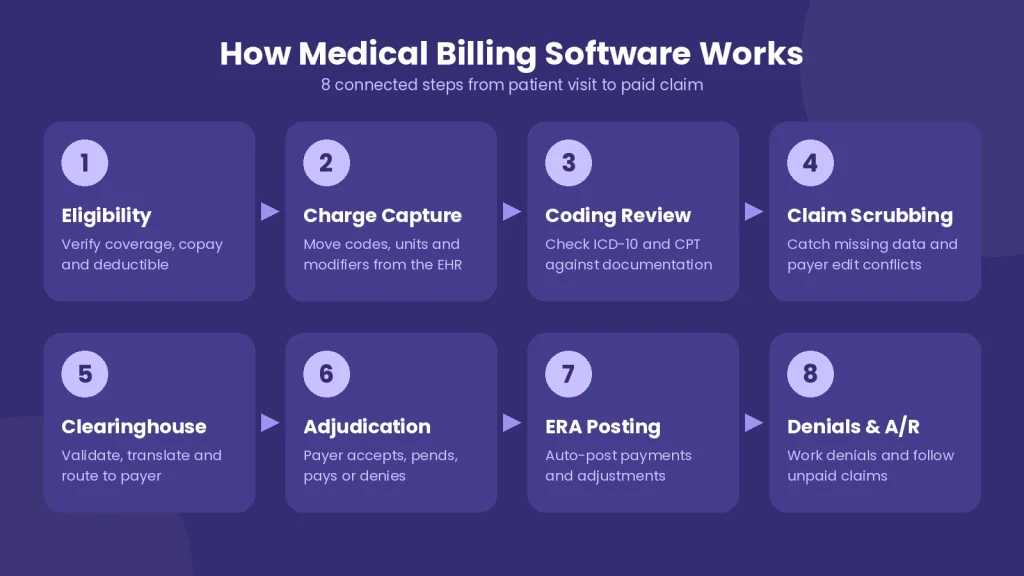
Medical billing software works by moving financial and clinical data through a series of connected transactions. A good system should make each handoff visible so staff can tell whether a claim is ready, rejected, accepted, paid, denied or still unresolved.
1. Patient registration and eligibility verification
The workflow starts with patient demographics, insurance information and coverage. Real-time eligibility tools can check active coverage, copays, deductibles and benefit details before the visit. Catching an inactive policy or mismatched member ID here is cheaper than correcting the problem after a denial.
2. Clinical documentation and charge capture
The provider documents the encounter in the EHR or practice system. Procedure codes, diagnosis codes, units, modifiers and other charge information then move into the billing workflow. When the billing platform integrates with the EHR, staff can avoid re-entering the same data in a second system.
3. Coding review
The software may suggest codes or apply edits, but coding accuracy still depends on the documentation and the service performed. Practices that need more support can use medical coding services for specialty-specific review and correction.
4. Claim creation and scrubbing
The system builds the claim and checks required fields, coding combinations, payer edits and other rules before transmission. A claim scrubber can catch missing data or obvious conflicts before they become payer rejections.
5. Clearinghouse and payer transmission
Most practices do not send every claim directly to every payer. The medical billing software and clearinghouse work together. The software creates the claim, while the clearinghouse validates, translates and routes the electronic transaction to the correct payer. HHS electronic transaction standards list12N 837 Version 5010 as the adopted standard for electronic institutional, professional and dental claims.
6. Adjudication and claim status
The payer receives the claim, applies coverage and payment rules and returns a response. Billing software can display claim status information so staff can separate accepted claims from rejections, pend statuses and denials that need action.
7. ERA and payment posting
After adjudication, the payer can send an electronic remittance advice. An ERA explains how charges were paid, adjusted or assigned to patient responsibility. Strong systems can auto-post much of this information while sending exceptions to a work queue.
8. Denial management and accounts receivable
The process is not finished when a claim leaves the practice. Staff still need to work denials, follow unpaid claims and monitor aging balances. The most useful billing systems make denial management services and accounts receivable management workflows actionable instead of burying them in static reports.
Medical Billing Software and Clearinghouse: What Is the Difference?
Medical billing software manages the practice’s billing workflow. A clearinghouse acts as the transaction layer between the practice and many payers. The two are related but they are not the same product.
| Function | Medical Billing Software | Clearinghouse |
| Primary job | Create, manage and track the billing workflow | Validate, translate and route transactions between providers and payers |
| Typical data | Patient, charges, codes, balances, work queues, reports | Claims, eligibility, claim status, remittance and other standard transactions |
| Main users | Billing staff, practice managers, physicians and RCM teams | Billing systems, provider organizations and payer networks |
| Key question | What needs to happen next on this account? | Can this transaction be accepted and routed correctly? |
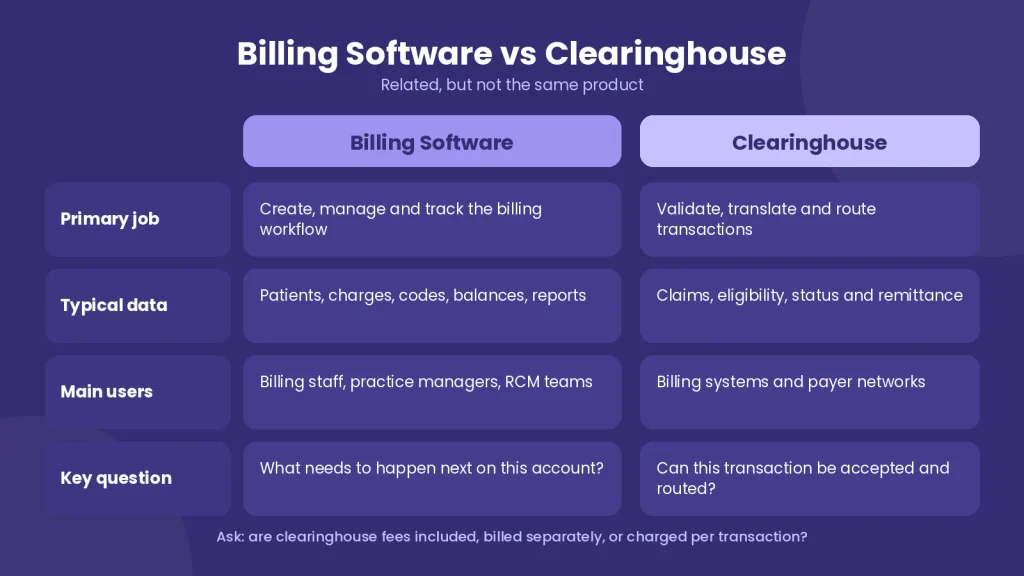
A small practice should ask whether clearinghouse fees are included in the subscription, billed separately or charged per transaction. A low software price can become less attractive if eligibility, claim submission, ERA, statements and clearinghouse access are all separate add-ons.
Best Medical Billing Software for Small Practices in 2026
There is no single best medical billing software for every small business. The useful comparison is fit. The shortlist below matches each platform to the type of small practice or billing operation it appears best suited to based on current vendor-published features and pricing information.
| Software | Best fit | Billing focus | EHR connection | Pricing visibility | Watch for |
| PracticeSuite | Small practices that want modular growth | Claims, billing, scheduling, patient engagement | Integrated platform with EHR options | Custom quote | Confirm reporting depth and interface needs |
| EZClaim | Small teams that want billing-first simplicity | Claims, ERA, eligibility, scheduling, payments | Integrates with external EHRs | $199/month first user on current monthly plan | Clearinghouse and add-on fees can apply |
| Elation Billing | Independent primary care | EHR-connected claims, eligibility, scrubbing and payment workflows | Native Elation EHR integration | Custom quote | Best fit is strongest for primary care |
| CureMD | Practices that want an all-in-one clinical and billing stack | Claims, eligibility, scrubbing, denial tracking, ERA and A/R | Integrated EHR and practice management | Custom quote | Evaluate implementation scope and modules |
| athenaOne | Growing groups that want automation plus practice management | Coding, scrubbing, denial guidance, reporting and collections | Native athenaOne EHR and PM | Custom quote | May be more platform than a very small office needs |
| Waystar | Billing services and practices needing advanced revenue automation | Claim status, coverage detection, denials, appeals and analytics | Designed to connect across RCM environments | Custom quote | Assess whether you need a full practice system or an RCM layer |
Pricing note: Vendor prices and packages change. Verify current pricing, clearinghouse charges, implementation fees and included modules before purchase.
1. PracticeSuite: Best for Modular Growth
PracticeSuite is a cloud-based platform built around modular billing, EHR, scheduling and patient engagement. Its pricing page emphasizes custom packages, unlimited administrative users in some configurations and per-provider or per-transaction options for lower-volume practices. That flexibility makes it useful for a small office that wants to start with billing and add modules later rather than replacing the whole stack.
Best fit: A solo or small group that wants medical billing software for physicians without committing to every clinical and administrative module on day one.
2. EZClaim: Best for Simple Billing-First Workflows
EZClaim is designed for small to medium-sized provider offices and outsourced billing firms. Its current product pages list electronic claim submission, claim status verification, ERA auto-posting, real-time eligibility, authorization tracking, scheduling, payment collection and cloud access. It also integrates with several clearinghouses and EHR vendors.
EZClaim is also one of the easier products to budget because it publishes pricing. Its current monthly plan lists the first user at $199 per month, with additional users and add-ons priced separately. The vendor notes that additional clearinghouse fees may apply.
Best fit: A small practice or billing service that needs focused claims software without paying for a full EHR replacement.
3. Elation Billing: Best for Independent Primary Care
Elation Billing connects clinical documentation and billing inside Elation’s EHR. The platform includes real-time eligibility, charge capture, automated claim checks, claim scrubbing, ERA posting and reporting. Its newer AI-assisted workflows can suggest codes and route high-confidence claims through a faster review path while keeping the practice in control of submission.
Best fit: An independent primary care practice that wants medical billing software EHR integration without maintaining separate clinical and billing databases.
4. CureMD: Best for an Integrated EHR, Practice Management and Billing Stack
CureMD combines medical billing, practice management and EHR functions in one platform. Current product pages highlight automated claims processing, an integrated clearinghouse, EHR integration, real-time claim scrubbing, eligibility verification, denial tracking, ERA posting and centralized A/R reporting.
Best fit: A practice that wants one vendor for clinical documentation, claims processing and financial reporting rather than stitching together multiple systems.
5. athenaOne: Best for Growing Practices That Want More Automation
athenaOne medical billing and practice management combines billing and practice management with athenahealth’s EHR environment. Its current platform includes AI-assisted coding, automated claim scrubbing, claim alarms, denial guidance, reporting and payer-rule intelligence.
Best fit: A growing practice that has enough volume to benefit from deeper automation, network intelligence and integrated operational reporting.
6. Waystar: Best for Advanced RCM Automation and Billing Operations
Waystar is strongest as a healthcare payments and RCM technology layer. Its billing-services platform focuses on automated claim status checks, coverage detection, denial and appeal workflows, analytics and custom automation. That can be useful for a billing company or practice with enough transaction volume to justify a deeper revenue-cycle platform.
Best fit: A small billing business, multi-provider group or RCM team that cares more about claims automation and revenue workflow than an all-in-one EHR.
Medical Billing Software Features That Matter Most
The longest feature list is not automatically the best product. For a small practice, the following medical billing software features matter because each one removes a specific failure point from the claim cycle.
| Feature | What it should do | Why it matters |
| Eligibility verification | Check active coverage and benefit details before service | Prevents avoidable front-end denials |
| EHR integration | Move demographics, documentation and charges without duplicate entry | Reduces manual work and data mismatch |
| Medical coding support | Validate or suggest diagnosis and procedure codes | Helps staff catch coding conflicts before submission |
| Claim scrubbing | Check required fields and payer rules before transmission | Improves first-pass claim quality |
| Clearinghouse connectivity | Transmit claims, receive responses and support standard transactions | Keeps payer communication inside one workflow |
| ERA auto-posting | Post payer payments and adjustments with exception handling | Cuts repetitive manual payment entry |
| Denial management | Group denials by reason, priority and next action | Turns denials into a work queue instead of a report |
| Accounts receivable | Age unpaid claims and assign follow-up | Shows where cash is stuck |
| Automation | Route routine tasks, reminders and claim follow-up by rule | Lets a small team handle more volume |
| Reporting | Track clean claims, denial rate, A/R days, collections and payer trends | Measures whether the workflow is actually improving |
After implementation, the practice should monitor whether the software is improving actual billing outcomes. A useful starting point is to track medical billing KPI benchmarks for small practices such as clean claim rate, denial rate and days in A/R rather than relying only on vendor dashboard activity.
Medical Billing Software Requirements for a Small Practice
Medical billing software requirements should be written before the demo, not after the contract. A practice that starts with a feature checklist is less likely to pay for functions it never uses or discover a missing integration after go-live.
Workflow requirements: List who registers patients, who verifies eligibility, who codes, who submits claims, who posts payments and who works denials. The software should support the real division of work in your office.
Payer requirements: Confirm that the clearinghouse and payer connections cover the plans that generate most of your claims. Ask how secondary claims, corrected claims, attachments and payer-specific edits are handled.
EHR requirements: Decide whether you need a native EHR, a bidirectional interface or a simple export/import connection. Ask which data elements move automatically and what still requires manual entry.
Reporting requirements: Define the reports you need before buying. At minimum, a small practice should be able to review claim status, denial reasons, aging A/R, payments, adjustments and patient balances.
Security requirements: Ask about role-based access, multi-factor authentication, audit logs, backup and recovery, data encryption, business associate agreements and how quickly access can be removed for a former employee.
Exit requirements: Ask how you will export patient, claim, payment and reporting data if you change vendors. A system that is easy to enter but difficult to leave can become expensive.
Is Medical Billing Software HIPAA Compliant?
Medical billing software can support HIPAA compliance, but buying a product labeled ‘HIPAA compliant’ does not make the practice compliant by itself. The practice and its business associates still need policies, access controls, workforce procedures and safeguards that protect ePHI.
HHS specifically identifies access control, audit controls, integrity protections, authentication and transmission security among the technical safeguard requirements. When comparing medical billing software security, ask the vendor to show how the system supports those controls instead of accepting a compliance badge as the entire answer.
How Much Does Medical Billing Software Cost?
Medical billing software costs can range from a relatively simple monthly subscription to a larger custom contract that bundles EHR, practice management, RCM tools and services. The subscription price is only one part of the total cost.
| Cost layer | How it may be priced | What to verify |
| Core software | Per user, per provider, per location or custom subscription | Which users and modules are included |
| Clearinghouse | Monthly bundle, per claim or separate vendor contract | Claims, eligibility, status and ERA transaction fees |
| Implementation | One-time setup or onboarding fee | Data migration, templates, payer enrollment and training |
| Interfaces | Setup fee plus recurring interface cost | EHR, lab, payment or third-party integration charges |
| Payments | Percentage plus transaction fee | Card processing, patient portal and statement costs |
| Add-ons | Per feature or per user | Analytics, texting, scheduling, portal and storage |
| Support | Included, tiered or premium | Response times and what counts as billable support |
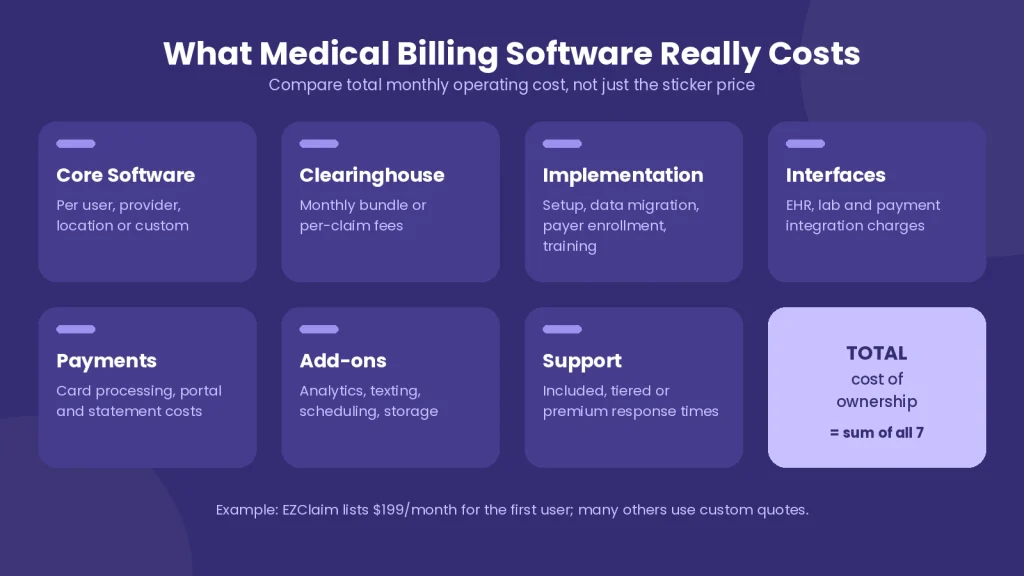
For a current public reference point, EZClaim lists its first monthly user at $199, while PracticeSuite, Elation, CureMD, athenahealth and Waystar use custom or personalized pricing for many configurations. That is why medical billing software pricing should be compared as total monthly operating cost, not just the number shown on the sales page.
How to Choose Medical Billing Software for a Private Practice
A private practice should choose billing software by testing the highest-risk parts of its own workflow. Do not spend the demo watching a polished dashboard. Ask the vendor to process the situations your staff handles every week.
- Show us how a new patient moves from eligibility verification to a claim without duplicate data entry.
- Show us what happens when a claim fails the scrubber or clearinghouse edit.
- Show us how the system displays a denial and assigns the next action.
- Show us how an ERA posts and what happens when the payment does not match the expected amount.
- Show us the A/R worklist by payer, age bucket and provider.
- Show us how a corrected claim, secondary claim and resubmission are handled.
- Show us the audit trail for a claim after more than one staff member edits it.
- Show us how data is exported if we leave the platform.
This simple test reveals more than a feature brochure because it exposes how many clicks, handoffs and manual workarounds the staff will inherit.
How to Set Up Medical Billing Software
A small practice should set up medical billing software in stages so errors are found before all payers and providers are moved at once.
Map the current workflow. Document registration, eligibility, coding, claim submission, payment posting, denial follow-up and patient billing before changing anything.
Clean the master data. Verify provider NPIs, tax IDs, payer IDs, locations, fee schedules, rendering and billing provider information.
Configure users and permissions. Give each staff member the least access needed for the job and enable stronger authentication where available.
Connect the EHR and clearinghouse. Test patient demographics, charges, diagnosis codes, procedure codes and claim responses in both directions.
Enroll payers for electronic transactions. Complete required enrollment for claim submission, ERA, EFT or other transactions where the payer requires it.
Run controlled test claims. Use a small set of real workflows and verify each response before moving full claim volume.
Measure the first 30 to 60 days. Track rejections, denials, A/R aging, payment posting exceptions and staff time. Fix the workflow before adding more automation.
Medical Billing Software Benefits and Where Automation Helps
The main medical billing software benefits are not the dashboard or the number of features. The value comes from reducing preventable handoffs, catching errors earlier and giving staff one place to see what still needs work.
Fewer duplicate entries: EHR integration can move patients and charge information into the claim workflow without retyping the same fields.
Earlier error detection: Eligibility checks and claim scrubbing can catch some problems before the payer sees the claim.
Faster routine posting: ERA automation can reduce manual payment entry while flagging exceptions for review.
More organized denial work: Denial management tools can group accounts by cause, payer and required action.
Better A/R visibility: A/R reports can show which claims are aging and where follow-up is overdue.
More consistent workflows: Rules and task automation can route routine work without depending on one staff member’s memory.
Automation still needs supervision. A system can identify a coding conflict or denial pattern, but someone has to determine whether the documentation supports a code change, whether the payer applied the contract correctly and whether an appeal is worth filing.
When Medical Billing Software Is Not Enough
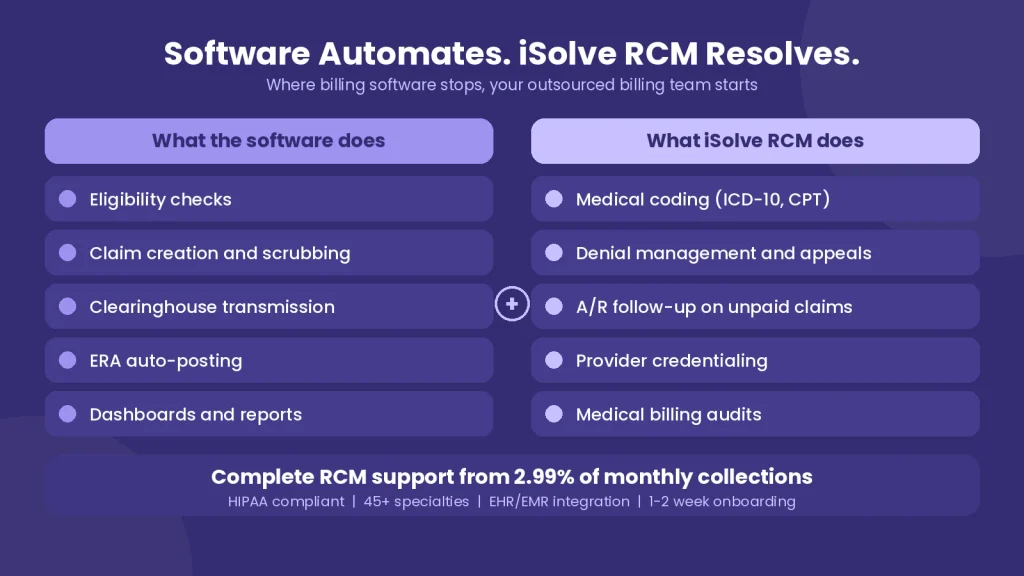
Software is a tool, not a billing department. A small practice can buy a strong platform and still struggle if no one has time to work rejections, interpret denials, follow unpaid claims or keep coding and payer rules current.
That is the point where the decision changes from ‘Which software should we buy?’ to ‘Should we keep billing in-house or outsource medical billing services?’ Outsourcing can make sense when the software plus internal labor, training and follow-up costs more than a specialized billing team. Keeping billing in-house can make sense when the practice has experienced staff, stable claim volume and enough time to work the entire revenue cycle.
For practices comparing the two models, review the expected software subscription, clearinghouse charges, staff cost, coding support and denial follow-up against the medical billing pricing available from an outsourced RCM partner.
A Practical Small-Practice Buying Checklist
- The platform supports your major payers and specialty workflows.
- Eligibility, claims, claim status and ERA are available without unnecessary manual re-entry.
- The EHR integration moves the data your staff actually needs.
- Clearinghouse fees are clear before contract signing.
- Denials become actionable work items, not just report rows.
- A/R can be filtered by payer, provider, age and claim status.
- User permissions, audit logs and security controls fit your HIPAA risk-management process.
- Implementation, training, migration and support costs are documented.
- You know how to export data if you change vendors.
- The total cost is lower than the financial and staffing burden it is supposed to remove.
Frequently Asked Questions
What is the most used medical billing software?
There is no single authoritative ‘most used’ medical billing platform across every practice type. Usage varies by practice size, specialty, EHR environment and whether billing is handled in-house or by an RCM company. Large integrated groups may choose platforms such as athenaOne or enterprise RCM tools, while small practices often prefer simpler products such as EZClaim or modular systems such as PracticeSuite.
What is the best software for medical billing?
The best medical billing software is the one that fits the practice’s claims workflow, payer mix, EHR, staff capacity and budget. For small practices, PracticeSuite is strong for modular growth, EZClaim for billing-first simplicity, Elation for independent primary care, CureMD for an integrated EHR and billing stack, athenaOne for deeper automation and Waystar for advanced RCM workflows.
What are the top 3 EHR systems in healthcare?
There is no universal top three EHR list for every healthcare setting. Epic and Oracle Health are major enterprise EHR platforms, while athenahealth is widely used in ambulatory and physician-practice environments. For a small practice, the better question is which EHR integrates cleanly with the billing workflow, specialty templates and payer processes the practice actually uses.
Final Takeaway
The best medical billing software for a small business is the system that makes the next billing action obvious. It should verify coverage, move clean data from the EHR, create and scrub claims, connect to a clearinghouse, post remittance information, organize denials and show aging A/R without adding more manual work than it removes.
Start with your workflow, not the vendor list. Then compare products against the claims, payers, staff roles and reporting needs that drive revenue in your practice. If the practice still needs a full team to operate the software, compare the total in-house cost with outsourced billing before making the final decision.