The implementation of electronic medical records is no longer considered a specialty-level enhancement but rather the mainstream operating protocol of American healthcare. According to the Office of the National Coordinator for Health Information Technology, nearly 100% of non-federal hospitals and 91% of office-based physicians have managed to implement their EHRs professionally up to 2024. This was made probable through the HITECH Act passed in 2009, which gave federal incentives to increase the implementation rate of EHRs from 42% to 100%.
Adoption alone, however, is not enough to ensure success. Interoperability research indicates that even though most hospitals join a health information exchange, only one-third of those are involved in both regional and national networks, constraining the flow of patient information between different systems. The distance between having an EHR system and working with it successfully is what creates pressure on practices regarding finances and operations, especially given the fact that billing and clinical documentation become connected to each other via the same record. Learning the basics of electronic medical records and EHR systems along with their role in revenue becomes absolutely crucial for practices. A dependable medical billing company in USA helps healthcare providers manage billing processes efficiently and improve revenue collection.
What Is an EHR System? Understanding EMR and EHR
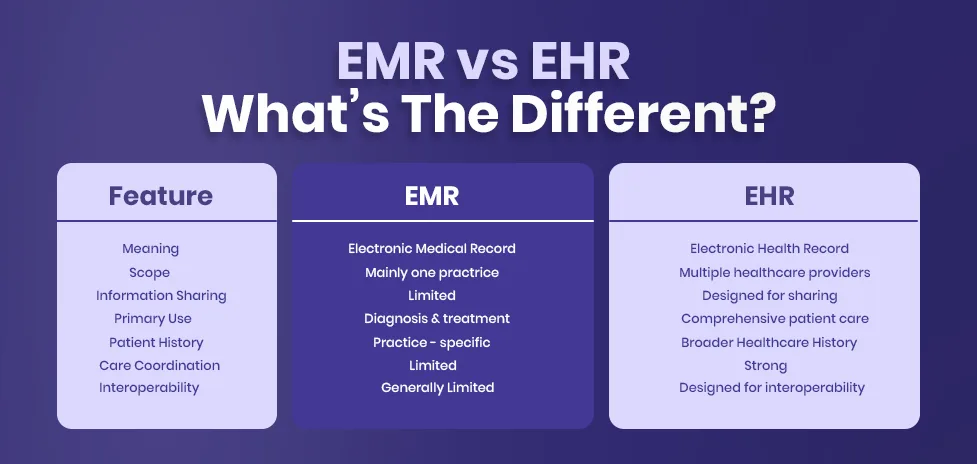
EHR system refers to the electronic health records system which is the computerized medical record of the entire health care history of a patient collected by the provider over time. The information included in an EHR system usually consists of demographics, progress notes, medications, immunizations, laboratory and laboratory test results, radiology images, and so forth. It is designed to share with various providers involved in the care of the patient. When asked about what is an EHR system, the answer would be straightforward that it acts as an integrated health record.
Electronic medical records, on the other hand, are usually just the digital versions of the paper records used in one practice. And so, what is an EMR system? In simple terms, it is usually more limited in use because it is meant primarily for diagnostic purposes within the practice and not for sharing across networks. This is the very crux of the EHR vs EMR debate that many practice owners struggle with while assessing new technologies. It is also the answer to EMR vs EHR.
The reason why the difference between EMR and EHR is important is the fact that it influences the extent of use that a practice may have with the information that they obtain. It may prove difficult for a practice that uses an electronic medical record system to send history to a specialist or a hospital because it was not designed to be able to do so; but an electronic health record system was made for this purpose right from the beginning.
How Electronic Health Record Systems Work in Everyday Practice
The process through which an EHR system works begins from the moment of the initial patient encounter. In a patient encounter, the data relating to the demographics and the insurance coverage of the patient is entered into the electronic medical record system by the personnel working at the reception desk. The data entry done by the clinicians in the electronic medical record takes place using a templated method.
However, under the hood, the system categorizes all this information in structured data that allows the use of clinical decision support prompts, quality measures, and eventually coding for billing purposes. Lab orders, imaging requests, and prescriptions are sent electronically to the respective departments or pharmacies, and the results are imported back to the patient’s chart when available. The cycle is one of the elements that distinguishes an electronic medical records system from just another digital filing cabinet.
When outsourcing the service for medical coding and billing, the workflow is very relevant since the coders and billers rely on the documentation generated at the point of service. The use of the electronic health record system will result in smoother processing of the claims through the entire revenue cycle since the story behind each code has already been documented in a structured manner within the system. Professional medical coding services guarantee precise coding of diagnoses and procedures for appropriate claims submission and reimbursement.
Expert Insight: Ensure that the EHR process flows smoothly throughout the entire process from intake to billing. Documentation during the process provides coders and billers with what they require in terms of accuracy, thereby minimizing claims and speeding up payments.
Benefits and Advantages of Electronic Medical Records
Following are the benefits of electronic medical records:
EMRs offer many more advantages other than just digitizing paper records. First, the legibility becomes much better from the start since typed and templated notes do away with any guessing involved in interpreting handwritten notes. At the same time, most of the EMRs come with clinical decision support systems that are capable of detecting potential drug interactions, allergy problems, or missed screens in patients.
When considering benefits of an EHR system, one must consider care coordination in practice that sees coordination among several specialists who treat one patient. Having one record with all the necessary information provides an opportunity for a primary doctor, a cardiologist, and a physical therapist to work with one and the same medical situation rather than trying to figure everything out from either faxes or verbal communication. Structured documentation, which goes along with the implementation of EHRs, leads to the decrease in medication errors.
But for the administrators, some of the key benefits of the electronic medical records could be those that are associated with efficiency and compliance. The audit trails in the system would be automated and would track all entries and revisions to ensure compliance with reporting regulations as well as conduct internal audits. The medical coding process itself is greatly benefited by this system because a coder would be able to follow the supporting note for any particular diagnosis or procedure. Outsourcing medical billing services permits medical practices to minimize administrative workload, minimize errors, and focus more on patient care.
Types of EHR Systems Available to Modern Practices
Every electronic health record system does not have the same type of setup, and knowing the different types of EHR systems available will assist in choosing the right one that matches the size and specialty of the practice instead of settling for a one-size-fits-all program that causes difficulties later down the line. The various types vary when it comes to hosting, pricing, and maintenance.
Cloud Based EHR Systems
Cloud based systems store the patients’ information in off-site servers controlled by the software company and can be accessed via a web browser. These systems need little hardware installation in the practice, are always updated automatically, and are usually the quickest systems to install.
Client Server EHR Systems
The client server technology works using the hardware provided by the firm. The administrator gets full control over the data storage and customization, but it needs constant internal or external support for upgrading and maintaining security patches.
Remote Hosted EHR Systems
In a remote hosted model, a third-party stores and manages the server infrastructure on the practice’s behalf, offering a middle ground between full cloud access and full-on premise ownership. Practices retain more customization than a pure cloud model while avoiding the burden of managing physical servers.
Specialty Specific EHR Systems
The systems are based on the processes in a specific field like behavioral health, dermatology, or orthopedics, using specific templates and coding that apply to those fields. They usually involve fewer clicks than general software applications and are faster when it comes to writing notes.
Integrated EHR and Billing Systems
Some vendors combine clinical documentation with billing and scheduling functions in a single platform, allowing information to flow between the clinical note and the claim without manual reentry. This category is especially relevant when evaluating types of electronic medical records for a growing multi provider practice.
Standalone Clinical EHR Systems
A stand-alone system concentrates on clinical documentation only, and does not provide any capabilities for handling billing, scheduling or other functions, which are done by some other specialized systems that are interconnected through information exchange.
Government and Federal EHR Systems
Certain systems are built specifically for federal or public health settings, such as veterans’ facilities or community health centers, and must meet reporting requirements distinct from those used by private practices. These systems illustrate how broadly the category of types of EHR systems actually spans across the healthcare landscape.
EHR System Requirements Every Practice Should Understand
Failing to select a platform while not having a clear idea of the requirements for the EHR system is perhaps the most frequent cause of implementation failures. Requirements should be outlined based on reviewing routine clinical and administrative workflows, after which the features will be mapped to them rather than the other way around. Denial management services often trace preventable claim denials directly back to gaps that could have been addressed at this requirements stage.
Certified Technology Standards
A practice should confirm that any electronic medical record system under consideration meets current federal certification standards, since certification affects eligibility for incentive programs and confirms a baseline level of interoperability and security.
Usability and Workflow Fit
The process needs to be designed based on the workflow of the practice, not vice versa. An actual pilot program with real-life examples would give more insights into usability compared to a sales pitch from vendors.
Data Migration Capability
Those who are considering changing to a new system after using an electronic health record system would need to know how their patient history would transfer, what form it would take, and how the information would be validated.
Interoperability and Exchange
The system needs to be able to use standard formats for the exchange of data so that it can easily exchange information with laboratories, drug stores, hospitals, and other healthcare facilities.
Security and Access Controls
Role based access, encryption, and audit logging are baseline requirements rather than optional extras, particularly given how frequently healthcare data breaches involve improperly restricted records.
Mobile and Remote Access
Providers increasingly need secure access from multiple devices and locations, especially in practices offering telehealth or covering multiple sites, making mobile compatibility a practical requirement rather than a convenience.
Vendor Support and Longevity
The success of any technical system is dependent on the vendor that provides the service. It is important to assess the vendor based on the clients, the financial strength of the vendor, and responsiveness.
Insight for Practices: Before choosing the EHR software solution, you have to determine your practice’s workflow. Only then you can evaluate each software for its compatibility with your requirements including usability, connectivity, security, data migration, mobility, vendor assistance, and many more.
The EHR Implementation Process from Planning to Go Live
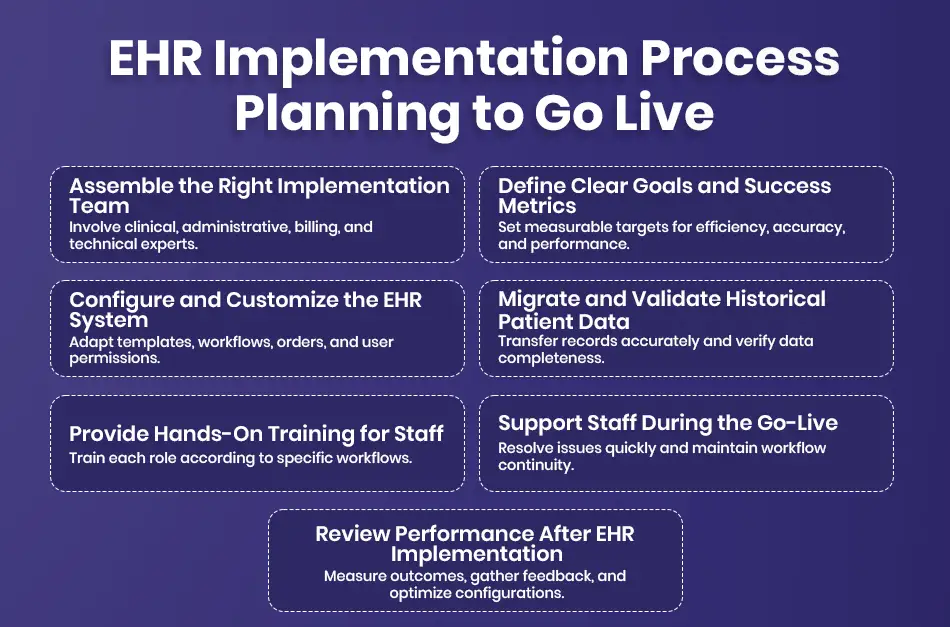
A good EHR implementation process will minimize any disruption that will be associated with system changes, as well as help to maintain clinical continuity and flow of money through the period of transition. One of the reasons why there can be prolonged loss of productivity after implementation is that the process was rushed.
Assembling an Implementation Team
EHR Implementation requires a team that is well defined with members from the clinical, administrative, billing, and technical side of the hospital because decisions that are made on their own often leave gaps.
Defining Goals and Success Metrics
Prior to the configuration process, measurable objectives like less documentation time and faster claim processing should be set by the team in order for the new EHR system to be evaluated against its performance.
System Configuration and Customization
Templates, order sets, and user roles are built out during this stage to match the practice’s specialty and daily workflow, which is also when many practices decide how closely billing functions should integrate with clinical documentation.
Data Migration and Validation
Historical patient records are transferred from the legacy system and checked for accuracy and completeness, since missing or corrupted data at this stage can create downstream problems for both clinical care and claims.
Staff Training
Specific hands-on training for every position, not a general training program, will help the employees acquire comfortable skills more quickly and minimize mistakes that are usually made during the first few weeks of a new system being introduced.
Go Live Support
A defined go live period with on site or readily available support helps staff resolve issues in real time rather than developing informal workarounds that can compromise documentation quality or billing accuracy.
Post Implementation Review
After several weeks, the team can then review their original objectives, obtain feedback from their staff, and change their configurations as necessary because the process of implementing an EHR system is hardly ever completely finished once go-live is accomplished.
EHR Integration and Interoperability Across Care Settings
Integration of the EHR system will determine whether the practice’s electronic medical record system will run as an isolated system or an interconnected one. In the past ten years, the EHR system’s interoperability has been steadily improving, but significant differences have been noticed especially where the need for transfer of patient information involves multiple vendors.
Health Information Exchange Participation
Joining a regional or national health information exchange allows a practice’s electronic health record system to send and receive records with other participating organizations, supporting more complete patient histories at the point of care.
Laboratory and Imaging Connections
Direct access to reference labs and radiology centers ensures that the information is transferred automatically into the medical chart, thus avoiding the problems related to manual input of faxed or scanned reports.
Pharmacy and Electronic Prescribing Integration
Electronic prescribing links allow physicians to route the prescription directly to a patient’s chosen pharmacy, while at the same time verifying any interaction issues and whether the drug is covered by the formulary.
Practice Management and Billing Integration
Strong EHR integration with billing systems allows charges to flow from the clinical encounter into the claims process with minimal manual reentry, which is where Revenue Cycle Management practices most directly intersect with clinical documentation.
Hospital and Referral Network Connections
When an EHR system connects with hospital systems, referral communication improves significantly, since specialists can review relevant history before an appointment rather than starting from limited information provided by the patient.
Patient Portal Interoperability
Portals connected directly to the underlying electronic medical record system let patients view results, request refills, and message providers without staff manually transferring information between separate platforms.
Vendor to Vendor Data Exchange Standards
Common data exchange standards are what make it possible for information to be exchanged between two dissimilar EHR systems from two different software vendors, and that continues to be a big problem in the industry.
Choosing the Best EHR Software for Your Practice
Choosing the right EHR software for a particular office hinges much more on the suitability of the software than on its name recognition, because the highest-rated software for a big hospital chain may not be suitable at all for a small clinic that has only two practitioners.
Matching Software to Practice Size
A good system for a sole practitioner may not be suitable for a group of practitioners dealing with different specialties because of cost considerations and technical issues involved.
Evaluating Specialty Specific Features
Software designed for the needs of the general practitioner may not have templates that could be used for specialties such as behavioral medicine or orthopedics. Therefore, the fit needs to be verified independently of information provided by the vendor.
Reviewing Total Cost of Ownership
Besides the subscription price, other aspects that must be considered while evaluating the different software systems are the training period, costs of migrating data, hardware requirements, and support charges.
Testing Real World Usability
The most suitable EMR software should be tested using the practice’s own patient cases and not vendor demo cases because they have been formulated in such a way as to eliminate friction points.
Checking Reporting and Analytics Depth
Medical records management software must be strong enough to provide clear reports on quality measures, productivity, and completeness of documentation, serving both compliance requirements and daily operations decision making.
Confirming Support and Training Resources
Continued availability of responsive support services and well-developed onboarding processes for new hires frequently differentiate electronic health records software that is truly successful from software that simply seems to be during the sales cycle.
Verifying Compatibility with Existing Tools
A good EMR system should integrate seamlessly with current scheduling, billing, and laboratory systems because changing all of these systems at once increases the cost and risks associated with the change process.
EHR Software for Small Practices: What Matters Most
The requirements of EHR software for small practices differ from those of enterprise applications intended for larger hospitals. Financial limitations, fewer support personnel, and restricted access to IT infrastructure impact the success of the application in a practice with up to five providers.
Simplified, Low Maintenance Deployment
Small practices can enjoy electronic health record solutions through cloud computing solutions as opposed to having in-house servers which will involve costly management by limited personnel who can rather use the time taking care of patients.
Predictable, Transparent Pricing
When designing an EHR system for smaller practice organizations, there should be clarity with regard to monthly fees that are straightforward, predictable, and without complexity in terms of tiers based on patients’ needs.
Regulated Documentation Templates
Smaller practices often benefit most from focused, specialty relevant templates rather than the extensive customization options built for larger systems, since simpler templates reduce documentation time per visit.
Built In Scheduling and Patient Communication
The incorporation of scheduling, reminders, and basic patient communications into the same electronic medical records software will lead to fewer software applications that an administration staff has to use on a daily basis.
Manageable Learning Curve
The importance of training time is much higher for small groups, so the system must be easy to understand such that staff can become proficient within days rather than weeks.
Vendor Support Without Enterprise Overhead
Small practices need responsive support without the lengthy account management structures built for large health systems, since a single unresolved technical issue can significantly disrupt a small clinic’s entire day.
Room to Scale
Even a small practice benefits from choosing an electronic medical records system capable of adding providers or locations later, avoiding a costly full replacement if the practice grows faster than expected.
Professional Guidance: EHR software selection for small firms should take into account the following factors such as simplicity, cost predictability, ease of training, support responsiveness, and scalability. The appropriate EHR software must be such as to decrease administrative burden, optimize workflow, and facilitate the firm’s growth.
EHR HIPAA Compliance and Data Security Essentials
EHR HIPAA compliance is not a one time achievement but an ongoing set of practices, since regulators continue to focus enforcement attention on risk analysis and patient access rights. Recent penalty data shows that a significant share of financial penalties have landed on small and mid sized practices rather than large hospital systems, making compliance a genuine priority regardless of practice size. Understanding how much do claim denials cost a medical practice makes the stakes clear, since recent industry data shows over 40 percent of providers now see denial rates above 10 percent of submitted claims, with average rework costs ranging from roughly 25 to over 100 dollars per denied claim depending on complexity.
Completing Annual Security Risk Assessments
A documented, annual Security Risk Assessment identifies vulnerabilities within the electronic health record system and forms the foundation of a defensible EHR data security program during any regulatory review.
Maintaining Business Associate Agreements
Every third party vendor that touches patient data, not only the primary EHR vendor, requires a signed business associate agreement, since missing agreements are themselves a compliance violation regardless of whether a breach occurs.
Enforcing Role Based Access Controls
Granting access to information that is essential for their job duties only minimizes any unintentional disclosure and minimizes the risk of damage that can be caused by having access through a hacked account.
Documenting Staff HIPAA Training
Annual training of all employees who work with patient records shows that the organization is trying its best, and this will prevent simple mistakes that cause problems.
Encrypting Data at Rest and in Transit
Data encryption guarantees safety of the data whether it is stored on a server or transferred from one computer to another, and is seen as a basic requirement for any modern EHR system.
Establishing Backup and Downtime Procedures
Combining automated backup with a clearly defined and tested downtime process provides protection to a practice in case of disruption due to system failure or ransomware attack.
Auditing Access Logs Regularly
Routine review of system access logs helps a practice catch unusual activity early, supporting both EHR HIPAA compliance and broader confidence in the integrity of patient records.
Sound billing practices depend on the same discipline described throughout this guide. Once a claim leaves a well documented electronic health record, its financial outcome depends heavily on how efficiently it is coded, submitted, and tracked, which is why Medical Billing Audit Services are often paired with EHR optimization work to catch documentation gaps before they affect reimbursement.
AR management services complement a well run EHR system by keeping outstanding balances visible and actionable rather than letting unpaid claims age past the point of easy recovery. As payer rules continue to shift and documentation requirements grow more detailed, some practices are also exploring AI in Medical Billing to help flag missing information before a claim is submitted, though this remains one tool among many rather than a replacement for experienced coding and billing judgment.
How iSolve RCM Supports Your EHR and Billing Workflow
How does iSolve RCM fit into my organization? iSolve RCM works with your current EHR solution to enhance the linkage between documentation and dollars. The iSolve RCM team examines the flow of information from the patient’s chart to the insurer, searching for holes that can later become denials. In other words, iSolve RCM is not a replacement of your current EHR solution but an enhancement to the solution you already have.
FAQs
What is the main difference between an EMR and an EHR?
An electronic medical record typically stays within one practice’s chart system, whereas an electronic health record will be created to facilitate sharing across multiple healthcare providers. This is the key difference in the comparison of EHR versus EMR, and this is what influences the process of transferring patient information from a general practitioner to a specialist and to a hospital.
How long does a typical EHR implementation take?
Although timelines can vary according to practice size, an effective plan for implementing an electronic health records system for a small or medium sized practice could take many months from planning stage to post-implementation evaluation stage. Factors such as complexity of data migration, need for training, and degree of workflow customization all impact timelines.
What should small practices prioritize when choosing EHR software?
When choosing EHR software for a small practice, cost predictability, ease of learning, and vendor reliability should be considered more important than many customizations that suit large organizations. Cloud-based implementation will most likely be appropriate since it will eliminate the technical support requirement from a small office staff.
Why does EHR interoperability matter for patient care?
When an EHR is interoperable, then a complete patient record goes with them wherever they go, instead of being stuck at a single provider’s office. Otherwise, the incomplete record could potentially have an impact on decisions and also on billing and coding later down the line.
What are the biggest risks around EHR HIPAA compliance?
Some common risk areas are the absence of business associate agreements, out-of-date or missing annual security risk assessments, and insufficient role-based access controls. The data from recent enforcement cases reveals that small practices bear a significant number of penalties. Therefore, EHR data security must be practiced regularly.
How does a well-used EHR system affect medical billing outcomes?
If there is proper clinical documentation, the medical coders will have an easy time translating the encounter into billable codes, thus eliminating any avoidable denials. The EHR system forms the backbone of RCM if we consider the fact that claims can only be as clean as their documentation.