

Credentialing coordinators who start work in a new position always have 3 common questions within the first week of employment. First, what is meant by PECOS? Second, where can we get the provider’s PECOS number? Third, why was Medicare denial issued since the physician “is enrolled” in Medicare. All three answers exist within one federal database, and once understood correctly, Medicare enrollment will become predictable and transparent.
PECOS is the online system CMS uses to enroll physicians, non-physician practitioners, groups and facilities in Medicare. CMS also uses PECOS to manage every change to that enrollment after approval. Every Original Medicare claim your practice sends depends on a correct, active PECOS record behind it.
Let’s break down what PECOS means, which application each provider type files, the step-by-step enrollment process, how to find your Medicare ID after approval and the mistakes that slow applications down.
What is PECOS?
PECOS is Medicare’s Provider Enrollment, Chain and Ownership System, the CMS web portal where providers and suppliers enroll in Medicare, update enrollment data, reassign benefits and revalidate. CMS owns the system. Your Medicare Administrative Contractor (MAC), such as Novitas Solutions, Palmetto GBA or Noridian, reviews the applications filed in it and approves or denies them.
PECOS covers individual practitioners (physicians, nurse practitioners and physician assistants), medical groups and institutional providers such as hospitals and home health agencies. It applies to Original Medicare. Medicare Advantage plans are private plans that credential providers through their own processes.
What does PECOS stand for?
PECOS stands for Provider Enrollment, Chain and Ownership System. Each word describes what the system tracks:
- Provider enrollment: who is approved to bill, order or certify services for Medicare patients.
- Chain: how organizations connect, such as a physician reassigning benefits to a group or a group operating several locations.
- Ownership: who owns and controls each enrolled organization, including managing employees and authorized officials.
The “chain and ownership” part is why PECOS asks organizations for so much detail about owners and managers. Medicare screens those people as well as the practice.
What does PECOS mean for a medical practice?
Without an authorized PECOS enrollment, your practice will not receive payment from Original Medicare. In addition to affecting bills your office submits directly, Medicare reviews ordering or referring providers listed on laboratory, imaging, DME and home health claims using PECOS information. Failure to authorize your referring provider via PECOS could result in denial of another provider’s claim based on this requirement alone.
What is PECOS for Medicare?
Medicare Provider Enrollment, Chain and Ownership System (PECOS) stores Medicare provider enrollment information. When a Medicare claim reaches a MAC, the MAC evaluates the billing NPI number, location, specialty, and reassignment based on the information recorded in PECOS. Discrepancies between claim details and PECOS data lead to claim rejection and denial.
What changed in PECOS 2.0?
PECOS 2.0 is the redesigned version of PECOS, built around a national profile for every provider and consolidated applications. A consolidated application updates multiple enrollments at once, and CMS says the fees stay the same as filing each one separately. Logins did not change: you still sign in with your Identity & Access (I&A) username and password, and data from the old system carried over.

What is the difference between PECOS, NPPES and CAQH?
These 3 systems hold overlapping provider data, which is why new staff often mix them up:
| System | Run by | What it does | Who uses it |
|---|---|---|---|
| NPPES | CMS | Issues and stores National Provider Identifiers (NPIs) | Every HIPAA-covered provider, all payers |
| PECOS | CMS | Enrolls providers in Medicare and stores enrollment, reassignment and ownership data | Original Medicare and Medicare ordering/referring edits |
| DataSpring Provider Data Platform (formerly CAQH ProView) | DataSpring, powered by CAQH | Stores provider credentialing data used by participating health plans | Commercial and participating Medicare Advantage plans |
NPPES and PECOS share the same I&A login but do not sync automatically. Update an address in NPPES and you still need to report the change in PECOS.
What is PECOS enrollment?
PECOS enrollment is the electronic Medicare enrollment application filed in PECOS instead of on a paper CMS-855 form. The data and the review are the same as paper. The differences are speed of correction, tracking and fewer missing-signature problems, because The MAC cannot fully process a submitted PECOS enrollment application until the required electronic or uploaded signature is received. Paper applications are still accepted, but most practices file online.
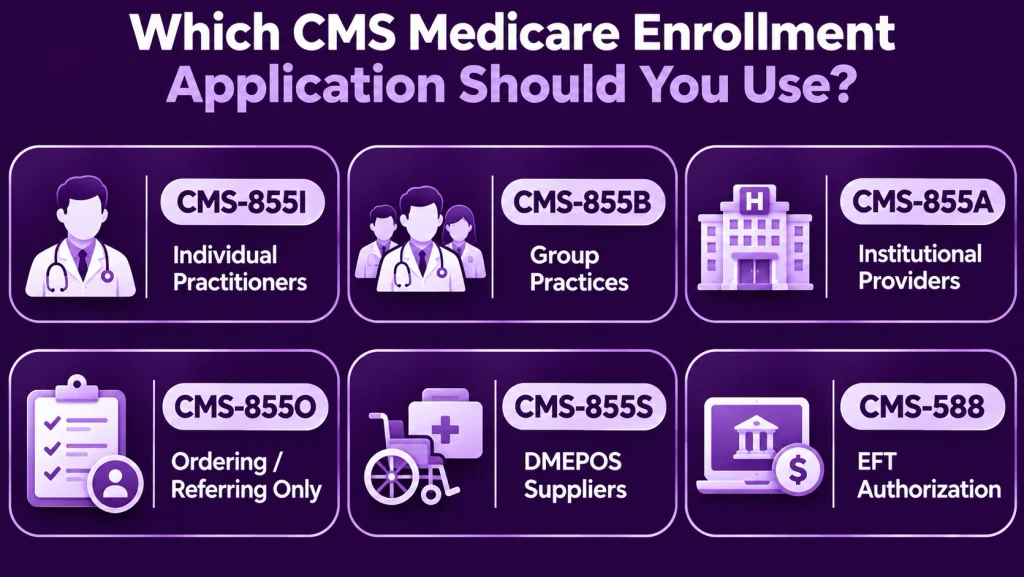
Which Medicare enrollment application does each provider file?
PECOS walks you through the right application based on your answers, but it helps to know which form sits behind each choice:
| Application | Who files it |
|---|---|
| CMS-855I | Individual physicians and non-physician practitioners, including sole proprietors. Also used to reassign benefits to a group (the old CMS-855R is now part of the 855I). |
| CMS-855B | Group practices and other organizational suppliers, except DMEPOS suppliers |
| CMS-855A | Institutional providers such as hospitals, home health agencies and skilled nursing facilities |
| CMS-855O | Physicians and eligible practitioners who enroll only to order, refer or certify and do not bill Medicare |
| CMS-855S | DMEPOS suppliers |
| CMS-588 | Electronic funds transfer (EFT) authorization for Medicare payments |
| CMS-460 | Participating physician or supplier agreement (optional); participating providers accept assignment on all claims |
A new group practice usually files a CMS-855B for the group, a CMS-855I with reassignment for each clinician and a CMS-588 for payments.
Is there a Medicare application fee in PECOS?
Physicians, non-physician practitioners and physician or practitioner groups do not pay a Medicare application fee. Institutional providers and certain suppliers do. The fee is $750 in 2026, and it applies when those providers enroll, re-enroll, revalidate or add a practice location. PECOS prompts for payment during the application, and a hardship exception can be requested case by case.
How do you enroll in Medicare through PECOS step by step?
Enrolling in Medicare through PECOS takes 8 steps: get an NPI, set up I&A access, gather documents, start the right application, complete it, sign and submit, answer MAC requests and set up billing after approval. Here is each step in order.
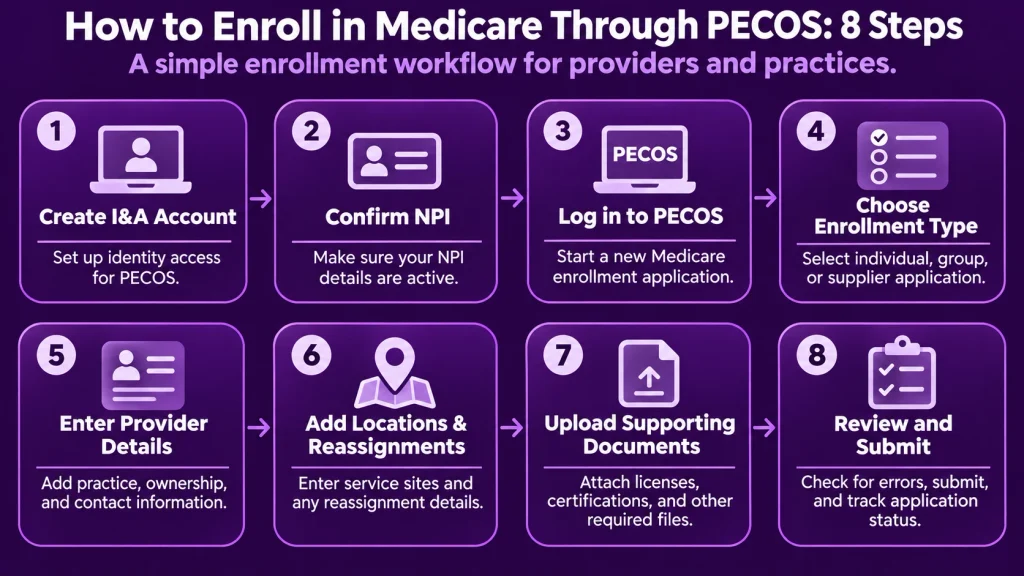
Step 1: Do you have a National Provider Identifier?
Every individual practitioner needs a Type 1 (individual) NPI and every group needs a Type 2 (organizational) NPI from NPPES before starting PECOS. Check the NPPES record first. The name, practice address and taxonomy in NPPES need to match what you enter in PECOS, or the MAC will send a development request.
Step 2: Is your Identity & Access account set up?
PECOS uses the CMS Identity & Access Management System (I&A). The same I&A account also opens NPPES. For an organization, the Authorized Official (AO) registers in I&A, connects to the organization and approves Access Managers, who then approve staff and outside users. A billing company or credentialing service works as a “surrogate” with access granted by the provider or the organization.
Pro tip: I&A passwords expire every 60 days and multi-factor authentication is required. Set a calendar reminder for whoever holds the AO and Access Manager roles, because an expired I&A password prevents access to PECOS until it is reset, potentially delaying application updates or responses to MAC requests. It does not automatically stop the processing of applications already submitted.
Step 3: Which documents do you need before you start?
Gather these items before opening the application so you can finish in one session:
- NPI, Social Security number and date of birth for each individual practitioner.
- State medical license, board certification (if applicable) and any DEA registration.
- Practice location addresses, including where records are stored and where payments go.
- Group legal business name and TIN, with the IRS letter that confirms them (such as a CP-575).
- Bank details and a voided check or bank letter for the CMS-588 EFT setup.
- Names and details of owners, managing employees and the Authorized Official for organizations.
- Any final adverse legal actions, such as license suspensions or exclusions, with documentation.
Missing or mismatched items from this list cause most MAC development requests.
Step 4: How do you start the right application in PECOS?
Log in at pecos.cms.hhs.gov, open the provider’s or organization’s national profile and start a new application. Choose the scenario that fits: initial enrollment, reassignment to a group, ordering and certifying only, adding a location or revalidation. PECOS selects the matching CMS-855 data set from your answers.
Step 5: What goes into the application sections?
PECOS asks for identifying information, licensure, specialty, practice locations, reassignment, ownership and managing control, final adverse actions and the billing agency if you use one. Answer every question even when the answer is “none.” Pick the specialty that matches how the provider bills, because the specialty on file affects claim edits.
Documentation is key: Enter names, addresses and license numbers exactly as they appear on the source documents. “Suite 200” in PECOS and “Ste. 200” on the license is a small difference, but small differences are what MAC reviewers flag.
Step 6: How do you sign and submit the PECOS application?
The provider signs individual applications. For organizations, only the Authorized Official can sign the initial enrollment, while an Access Manager can sign later changes and revalidations. Sign electronically in PECOS or upload a signed certification page. The MAC cannot fully process a submitted PECOS enrollment application until the required electronic or uploaded signature is received, and signed pages cannot be mailed for a PECOS application. After submission, save the tracking number.
Step 7: How do you track the application and answer MAC requests?
Check status by logging in and opening View Enrollments, or use Application Status on the PECOS home page without logging in. When the MAC sends a development request for missing or corrected information, respond within 30 days. A MAC can reject an application when requested information is not returned in time, and a rejected application means a new filing date and a later effective date.
Step 8: What happens after Medicare approves the enrollment?
After approving a Medicare billing enrollment, the MAC generally issues an approval letter containing the effective date and Provider Transaction Access Number (PTAN). Practitioners enrolled solely to order or certify services through CMS-855O do not receive a PTAN. Before billing, complete EDI enrollment with your MAC (or through your clearinghouse), confirm the EFT is active and submit the CMS-460 if the provider is choosing participating status. Then compare the approval letter with PECOS one more time: location, specialty and reassignment all need to be right before the first claim goes out.

How long does PECOS enrollment take?
PECOS enrollment usually takes several weeks to a few months, depending on the MAC, the provider type and how many development requests the application gets. CMS does not publish a single processing guarantee, so plan for at least 60 days and file well before the provider’s start date.
Timing matters because of the effective date rule. For physicians and non-physician practitioners, the effective date is the later of the date the MAC receives an application it approves or the date the provider first saw patients at the location. Under 42 CFR §424.521, eligible providers may retrospectively bill for services furnished up to 30 days before their enrollment effective date when circumstances prevented earlier enrollment. This period may extend to 90 days before the effective date when a presidentially declared disaster prevented timely enrollment and all applicable requirements are met. A physician who starts on July 1 but files on September 1 cannot bill any July visits.
How to Avoid? Start the PECOS application as soon as the provider’s license and NPI are in hand, ideally 60 to 90 days before the first patient visit. Hold Medicare claims until the approval letter arrives, then bill everything inside the allowed window.
How do I find my PECOS number?
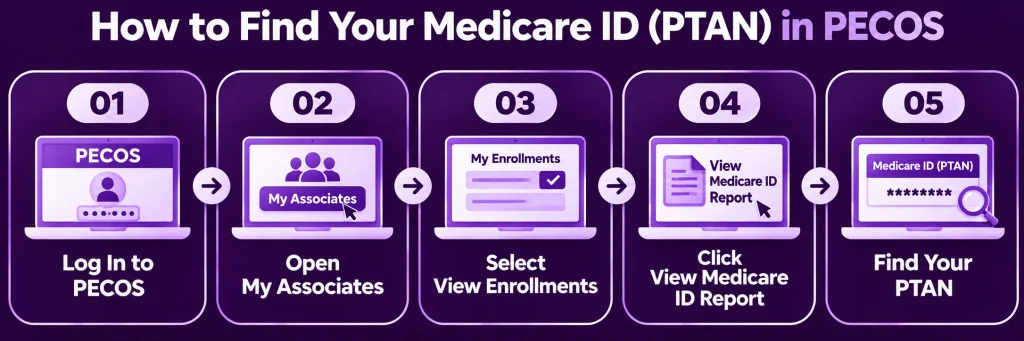
There is no separate “PECOS number”; most people asking for one need the Medicare ID (PTAN) issued after approval or proof that the provider’s NPI is enrolled in PECOS. Here is where to find each one:
- Medicare ID or PTAN: log in to PECOS, open My Associates, select View Enrollments next to the NPI or TIN and the Medicare ID shows on each approved enrollment.
- Without PECOS access: check the MAC approval letter, use your MAC’s PTAN lookup in its provider portal or call the MAC’s provider enrollment line with the NPI.
- Proof of enrollment for ordering and referring: search the provider’s NPI in CMS’s Medicare Order and Referring data on data.cms.gov, which lists practitioners with approved PECOS enrollment who are eligible to order and refer.
- Application tracking number: use the tracking number from submission with the Application Status link on the PECOS home page.
When a hospital, lab or DME supplier asks “is the doctor in PECOS?”, the Order and Referring data is usually the answer they want, not a number.
How do you keep a PECOS enrollment active?
A PECOS enrollment stays active when you report changes on time and revalidate when CMS asks. Most providers and suppliers revalidate every 5 years, while DMEPOS suppliers revalidate every 3 years. Due dates appear on the Medicare Revalidation List, and MACs send notices before the due date.
Physicians, non-physician practitioners and their groups have 2 reporting deadlines:
| Change | Report within |
|---|---|
| Change of ownership or control | 30 days |
| Practice location change | 30 days |
| Final adverse legal action (such as a license suspension) | 30 days |
| All other changes (phone number, billing agency, specialty and similar) | 90 days |
Missing a revalidation deadline can deactivate billing privileges, and claims for dates of service during the gap may not be payable.
What are the most common PECOS enrollment mistakes?
Most delays come from a short list of avoidable errors:
Data that does not match NPPES. Different addresses or names in NPPES and PECOS trigger development requests. How to Avoid? Update NPPES first, then copy the exact data into PECOS.
Forgetting reassignment. A physician enrolls individually but never reassigns benefits to the group, so group claims reject. How to Avoid? File the reassignment section of the CMS-855I (or the reassignment workflow in PECOS) with the initial enrollment.
Missing signatures. An application sits unsigned in PECOS and never reaches the MAC. How to Avoid? Confirm the “submitted to MAC” status, not just “completed.”
Slow development responses. A MAC request goes unanswered for 30 days and the application is rejected. How to Avoid? Assign one person to watch the PECOS inbox and the email on file.
Using the old CMS-855R. CMS merged the reassignment form into the CMS-855I, and MACs no longer accept the standalone 855R. How to Avoid? Use the current CMS-855I or the PECOS reassignment flow.
Ordering providers not enrolled. A referring physician has an NPI but no approved PECOS record, so the lab or imaging claim denies. How to Avoid? Enroll practitioners who only order or refer through the CMS-855O, and check referring NPIs against the Order and Referring data before scheduling.
What does PECOS enrollment look like in real practice scenarios?
These 4 situations cover most of the PECOS work a typical practice sees in a year:
Scenario 1: New physician joins an existing group. The group is already enrolled. File a CMS-855I in PECOS for the physician with reassignment to the group’s enrollment and add the group’s practice location. No application fee applies.
Scenario 2: New group practice opens. The AO sets up I&A for the organization, files a CMS-855B with the CMS-588 for EFT, then each clinician files a CMS-855I with reassignment. Start all of them together so the group and the clinicians are approved close to the same date.
Scenario 3: Hospital-employed resident who only orders tests. A hospital employed resident who orders tests may enroll through CMS-855O if the resident meets applicable state licensing and Medicare eligibility requirements. For residents who are not eligible to enroll independently, Medicare claims for ordered services must identify the appropriate teaching physician as required by CMS.
Scenario 4: Practice moves to a new suite. Report the new practice location in PECOS within 30 days. Update NPPES first so both records match.

Conclusion
PECOS is where Medicare enrollment starts and where it stays. Get the NPI and I&A access right, file the correct CMS-855 application through PECOS, answer MAC requests within 30 days and file before the provider’s start date so the 30-day retrospective billing window covers you. After approval, keep the record current with on-time change reports and revalidation every 5 years. Do that consistently and enrollment stops being the reason Medicare claims don’t get paid.
Frequently asked questions
What does PECOS stand for?
PECOS stands for Provider Enrollment, Chain and Ownership System. It is the CMS online system for Medicare provider and supplier enrollment.
What is PECOS Medicare?
PECOS Medicare refers to the Medicare enrollment system CMS uses to approve providers for billing, ordering and certifying services. PECOS also stores their enrollment, reassignment and ownership data.
What is PECOS enrollment?
PECOS enrollment is the electronic version of the Medicare CMS-855 enrollment application. Providers file it online in PECOS, and their Medicare Administrative Contractor reviews and approves it.
How do I find my PECOS number?
There is no separate PECOS number. Your Medicare ID (PTAN) appears on the MAC approval letter and in PECOS under My Associates and View Enrollments. To prove enrollment for ordering and referring, search your NPI in CMS’s Order and Referring data.
Is PECOS the same as NPPES?
No. NPPES issues and stores NPIs for all payers. PECOS stores Medicare enrollment records. Both use the same I&A login, but updates in one system do not automatically flow to the other.
Do physicians pay a fee to enroll in PECOS?
No. Physicians, non-physician practitioners and their groups are exempt from the Medicare application fee. Institutional providers and certain suppliers pay it, and the fee is $750 in 2026.
How often do you revalidate in PECOS?
Most providers and suppliers revalidate every 5 years, and DMEPOS suppliers revalidate every 3 years. CMS can also request off-cycle revalidation.